
 EN
EN BG
BG TR
TR RO
RO
Flat rate shipping
- Go to the Settings menu, under 'Modules' click on Shipping link.
- Find 'Flat rate' and click on Options link at the end of its row
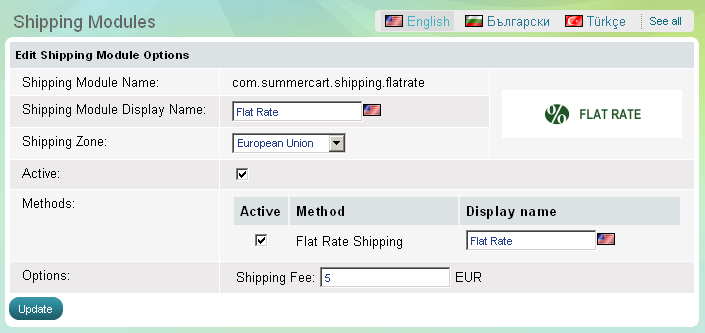
'Flat rate' shipping module enables you to deliver products charged by a flat rate to a shipping zone of your choice. To configure 'Flat rate' shipping module click on Options link at the end of its row.
To set up flat-rate shipping calculation follow two steps – opt for a shipping zone and enter a shipping fee.
Choose an appropriate shipping zone from 'Shipping zones' drop-down menu.
If you still haven't created an appropriate shipping zone, please go to the Settings menu, Locations and Taxes >>> Shipping zones link and create a new shipping zone.