EN
EN BG
BG TR
TR FR
FR
Languages overview
Introduction to languages in Summer Cart
Summer Cart shopping cart prides itself on the extensive multi-language features it offers to both store customers and store administrators. To help you easily manage languages throughout the entire store Summer Cart separates translations of customer data from interface translations.
You can translate both all customer data and all interface texts in all defined languages.
>> Open Summer Cart admin panel
>> Go to the Settings menu, under 'Languages and Currencies' click on Languages link.
Translations of customer data – overview
Summer Cart has an intuitive approach to translations of customer data and allows you to add multilingual descriptions on the spot with the help of 'Language selection bar'. 'Language selection bar' appears on the top of every screen where you create/edit a product, a category, a product option, a manufacturer, a country, a state, a tax, a rich text page and many others. See the screenshot below.
Also see detailed instructions about language selection bar.
Language Selection Bar
'Language Selection bar' enables you to translate texts, descriptions and messages for customer-related pages on the spot. Read more
Language Selection Bar in 'Create Product' page
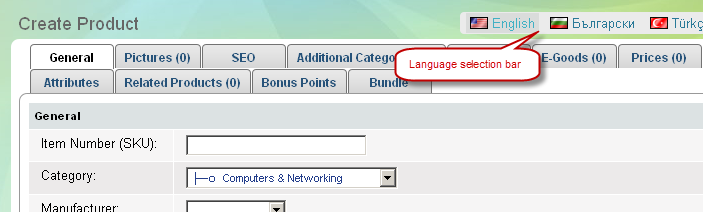
'Language selection bar' helps you in:
| • | 'Products' to add products in multiple languages |
| • | Product Options page to create product options in multiple languages |
| • | 'Categories' to create product categories in multiple languages |
| • | Manufacturers page to add manufacturers in multiple languages |
| • | Countries page to add countries in multiple languages |
| • | States page to add states in multiple languages |
| • | Taxes page to display applicable taxes in multiple languages |
| • | Rich Text Pages to display Rich Text Pages in multiple languages |
| • | Forms page to display contact forms and any custom forms in multiple languages |
| • | Menus page to display your website navigation in multiple languages |
| • | News page to post news articles in multiple languages |
and other sections of the admin panel where multi-language texts can be entered.
Interface translations – overview
"Interface translation" refers to all interface texts that appear in the Store Front and Admin Panel of Summer Cart.
The interface texts include:
| • | text labels |
| • | descriptions |
| • | auto-check warnings - some are visible to customers, others to administrators |
| • | button texts |
| • | box headings |
| • | table names |
| • | table fields |
| • | tab titles |
| • | image titles |
and others. All texts can be translated.
Changing current interface language
In Admin Panel you can change language with the help of 'Language' drop-down menu in the Login/Logout bar on the top right of every page.

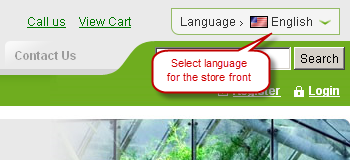
The customers can change the current interface language using the 'Select language' drop-down menu in the Store front.